> ## Documentation Index
> Fetch the complete documentation index at: https://docs.mathfi.ai/llms.txt
> Use this file to discover all available pages before exploring further.
# Hyperparameter tuning
> Tune MathFi.ai models for better accuracy by adjusting numberOfBuckets, performanceThreshold, and scalingFactor.
This guide walks you through the step by step process of tuning hyperparameters in the MathFi.ai platform to optimize training and gradually obtain better model performance. You can perform tuning interactively using the dashboard or programmatically via the [REST API](/developers/api-overview).
### What are the hyperparameters?
There are only 3 training hyperparameters within the MathFi.ai platform.
| Hyperparameter | Description |
| ------------------------- | ------------------------------------------------------------------------------------------------------------------------------------------------------------------------------------------------------------------------------------------- |
| **Number of Buckets** | Divides your dataset into bins for certain algorithms. Default: 20. Range: 4–200. *(Set in "Create Dataset" screen. Only algorithms BSEV02 (binary) and MSEV02 (multi-class) are sensitive to this hyperparameter.)* |
| **Scaling Factor** | Controls the number of "search cells" during training. Default: 19. Range: 8–499. *(Set in "Create Training" screen. Only algorithms BSIX01 and BFIF01 (binary) and MSIX01 and MFIF01 (multi-class) are sensitive to this hyperparameter.)* |
| **Performance Threshold** | Defines the minimum accuracy needed for model completion. Range: 0 to 1 (e.g., 0.8 = 80%). |
### Hyperparameter tuning video
You can continue reading this guide or watch a full example walkthrough of hyperparameter tuning in this video:
### Initial baseline training
Before tuning, complete one round of training using **default values**
* **Number of Buckets**: `20`
* **Scaling Factor**: `19`
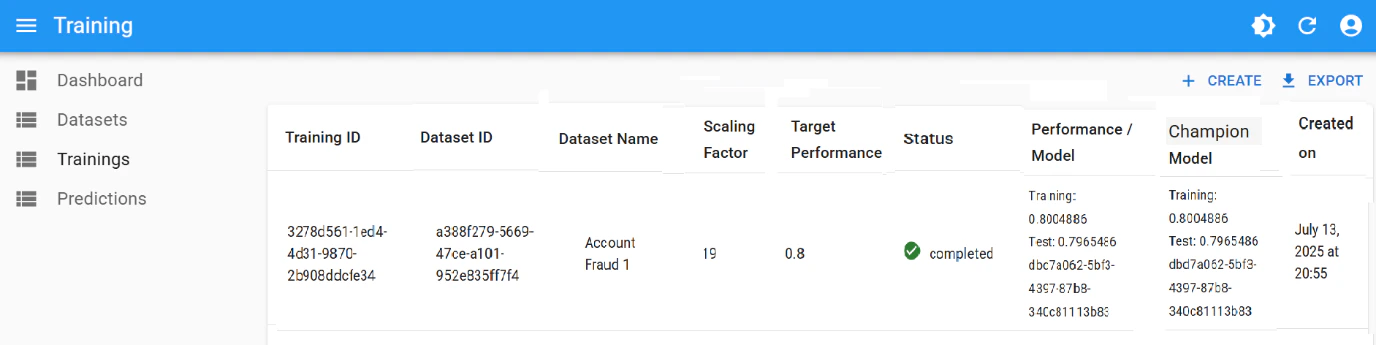
* **Performance Threshold**: `0.8`
See the [Training Guide](/guides/training-guide) to run this initial setup. The result should be an initial **champion model**.
### Step-by-Step tuning process
#### 1. Start by increasing the Performance Threshold
Following up with the initial training from the previous step:
* If **no model achieves > 0.8 accuracy**, the training will stop with status `Not Completed`
* If this is the case, inspect which algorithm came closest
* For example, if one algorithm reached `0.78`:
* Lower **Performance Threshold** to `0.78`
* Rerun training to attempt getting a new **Champion Model** with performance `0.78`
Start low. Do **not** begin with `0.95` or `0.99` — these values often fail early
#### 2. Gradually increase the threshold
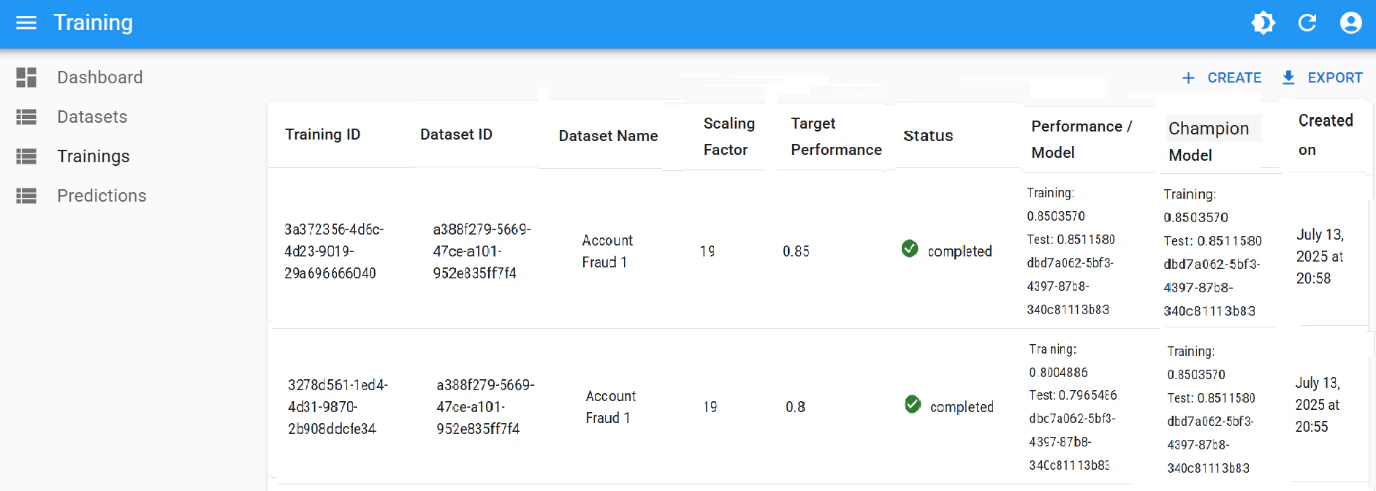
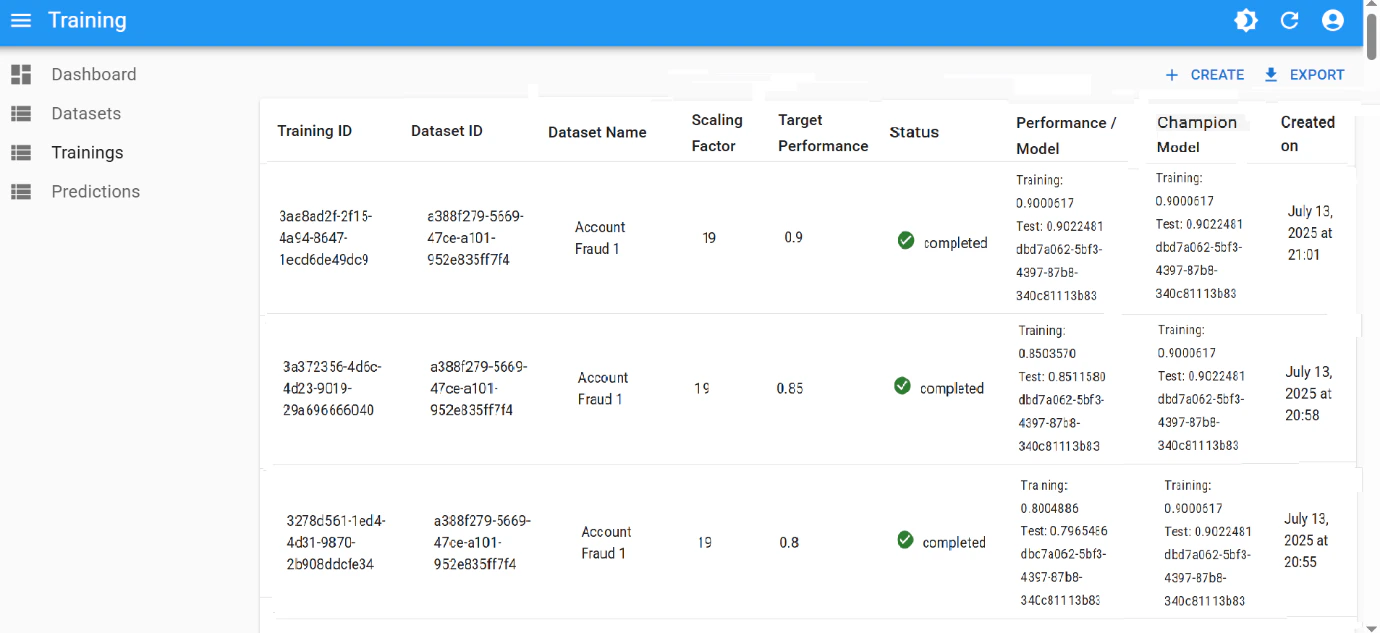
If MathFi.ai succeeds with the newly chosen threshold ( `0.8`, `0.78`, ...), continue increasing it in `0.05` increments:
* Set threshold to `0.85`, then `0.90`, then `0.95`
With each increase:
* Monitor if a new **Champion Model** is selected (training completes successfully with the chosen threshold)
* Watch for *overfitting* — train and test performance should stay close
#### 3. Handle failure at high thresholds
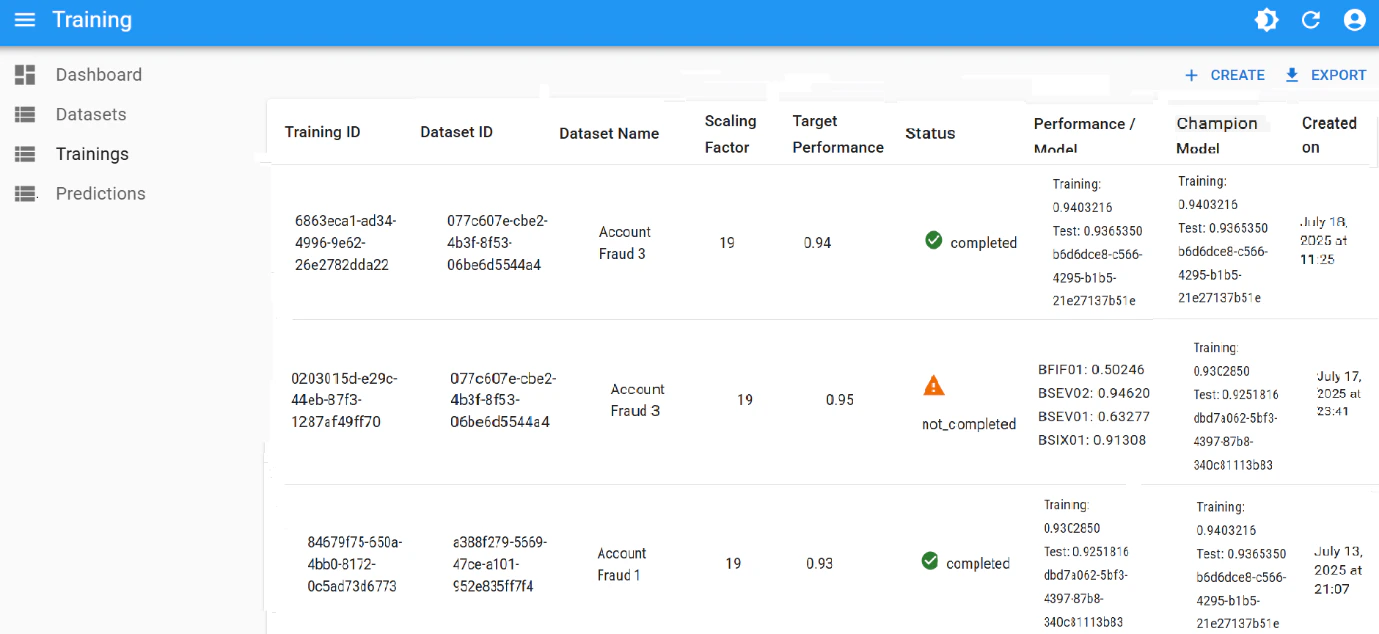
If you reach a threshold like `0.95` (or way lower) and training fails (e.g., `Timeout` or `Not Completed`), there are mainly 2 options to continue:
* Accept the lower accuracy or
* Move to tune other parameters
##### Option A: Accept a lower accuracy
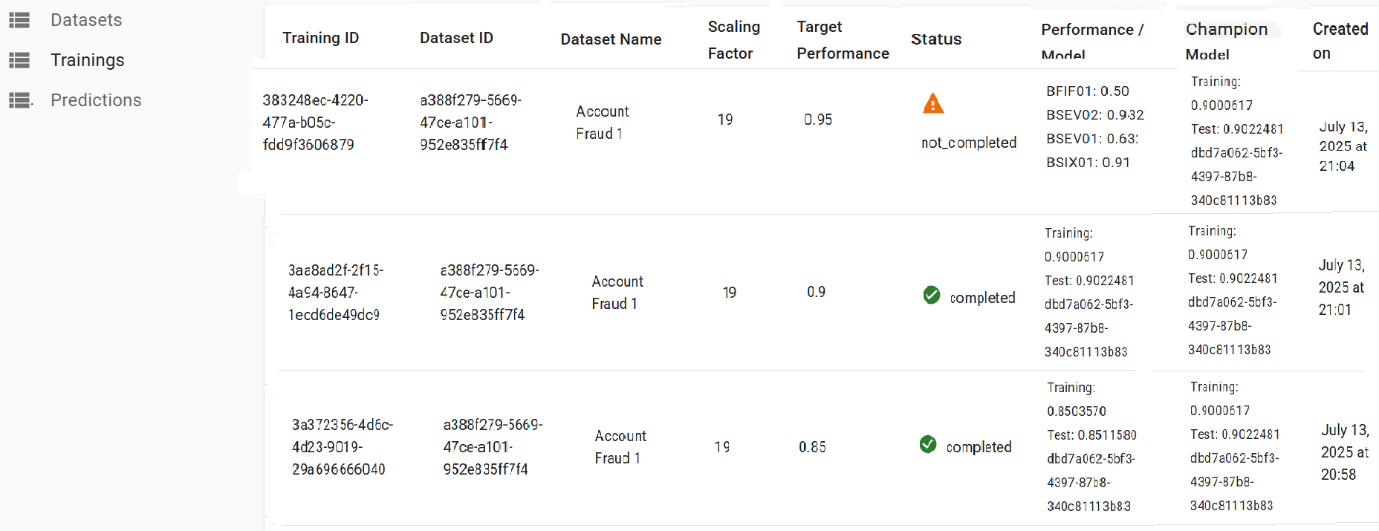
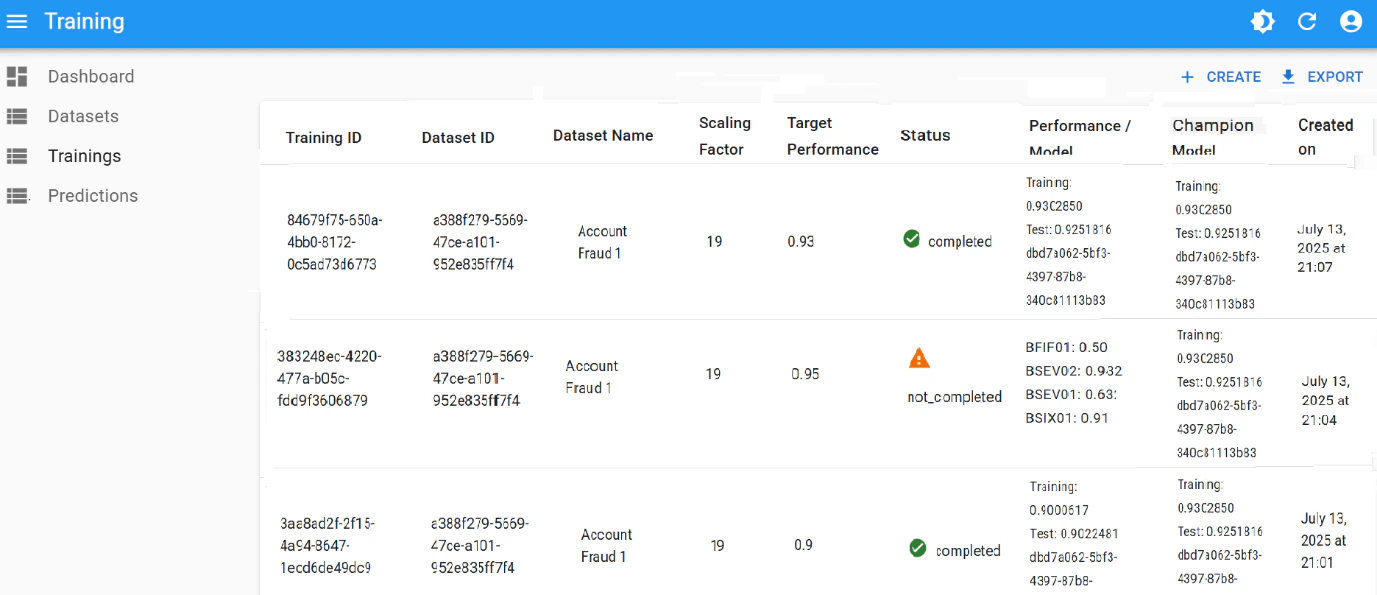
If `0.93` is acceptable (as the max seen in the Performance column):
* Lower **Performance Threshold** to `0.93`
* Rerun training
If this value wasn't acceptable, move to tune other parameters and keep the original, desired threshold.
##### Option B: Tune other parameters
* Keep **Performance Threshold** at your desired outcome (e.g. `0.95`)
* Adjust **Number of Buckets** or **Scaling Factor**
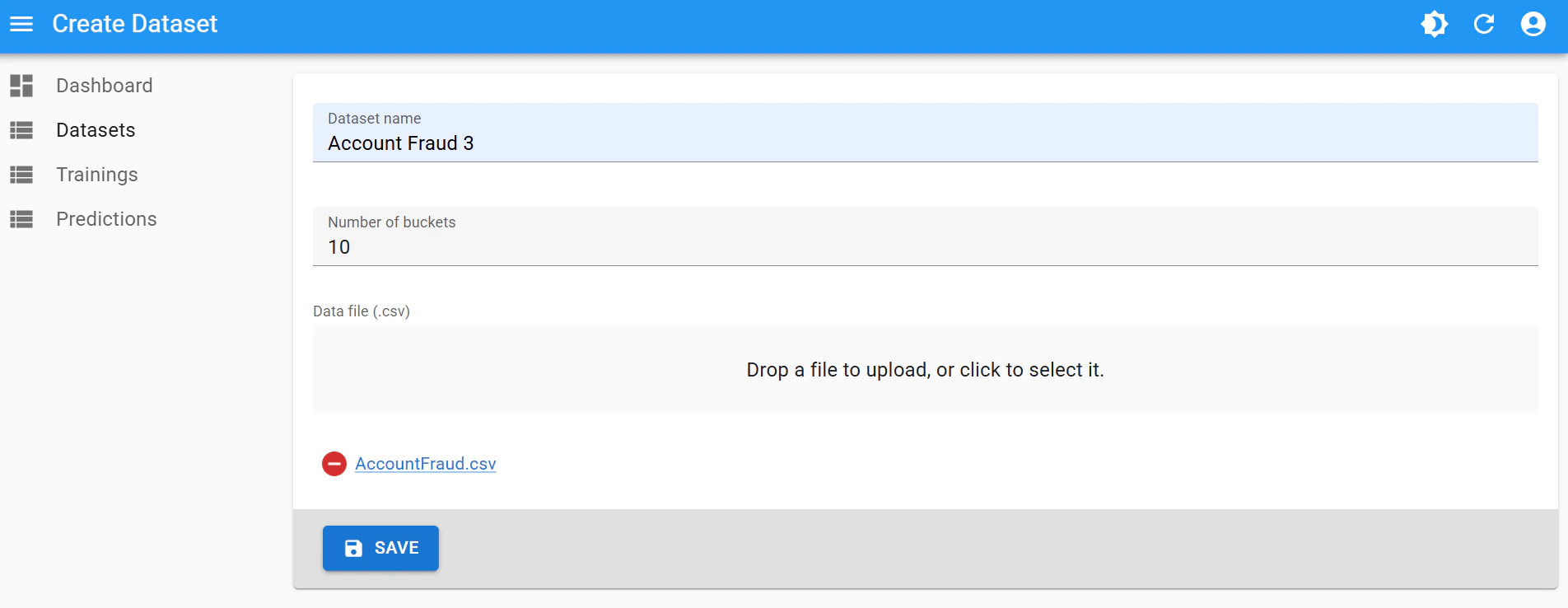
* e.g., Lower **Number of Buckets** from `20` → `10`
* For this, create a new dataset version with a different name (e.g., *Account Fraud 3*)
* Rerun training with this new dataset version, maintaining the desired threshold
* If a training reaches a very close value (e.g. `0.94`), update threshold to that value and rerun
#### 4. Repeat as needed
Continue this iterative process to tune performance:
* Adjust one hyperparameter at a time
* Log your results
* Stop when you reach desired accuracy or a maximum once enough combinations tried
### Sample tuning iteration
| Iteration | Threshold | Buckets | Scaling | Result |
| --------- | --------- | ------- | ------- | ------------------------ |
| 1 | 0.80 | 20 | 19 | ✔ Model Created |
| 2 | 0.85 | 20 | 19 | ✔ Improved Model |
| 3 | 0.90 | 20 | 19 | ✔ High Accuracy |
| 4 | 0.95 | 20 | 19 | ✖ Timeout (max was 0.93) |
| 5 | 0.93 | 20 | 19 | ✔ Model Created |
| 6 | 0.94 | 10 | 19 | ✔ Best Model Yet |
### Automating the process
All of the previous steps can be performed via the REST API:
* Upload CSV, create a dataset
* Run training
* Check results
* Re-run training with adjusted parameters or create another dataset version with new values
* Eventually, download predictions
See the [API Guide](/developers/api-recipes) to check examples on how to run this programmatically.
### Summary
| Step | What to Do |
| ------------------------------- | ---------------------------------------------------------------- |
| Start training | Use default hyperparameters |
| Improve accuracy | Gradually raise `Performance Threshold` |
| Once plateau at high thresholds | Tune other parameters (`Number of Buckets` and `Scaling Factor`) |
| Automate | Use the MathFi.ai API |
Need help tuning a specific dataset? Send us a *support* request.
See real tuning progressions in the use cases: [Credit Card Approval](/use-cases/credit-card-approval) and [Self-checkout Fraud](/use-cases/self-checkout-fraud) both show multi-step iterations that push performance above 95%.
 ##### Option A: Accept a lower accuracy
If `0.93` is acceptable (as the max seen in the Performance column):
* Lower **Performance Threshold** to `0.93`
* Rerun training
##### Option A: Accept a lower accuracy
If `0.93` is acceptable (as the max seen in the Performance column):
* Lower **Performance Threshold** to `0.93`
* Rerun training
 If this value wasn't acceptable, move to tune other parameters and keep the original, desired threshold.
##### Option B: Tune other parameters
* Keep **Performance Threshold** at your desired outcome (e.g. `0.95`)
* Adjust **Number of Buckets** or **Scaling Factor**
* e.g., Lower **Number of Buckets** from `20` → `10`
* For this, create a new dataset version with a different name (e.g., *Account Fraud 3*)
If this value wasn't acceptable, move to tune other parameters and keep the original, desired threshold.
##### Option B: Tune other parameters
* Keep **Performance Threshold** at your desired outcome (e.g. `0.95`)
* Adjust **Number of Buckets** or **Scaling Factor**
* e.g., Lower **Number of Buckets** from `20` → `10`
* For this, create a new dataset version with a different name (e.g., *Account Fraud 3*)
 * Rerun training with this new dataset version, maintaining the desired threshold
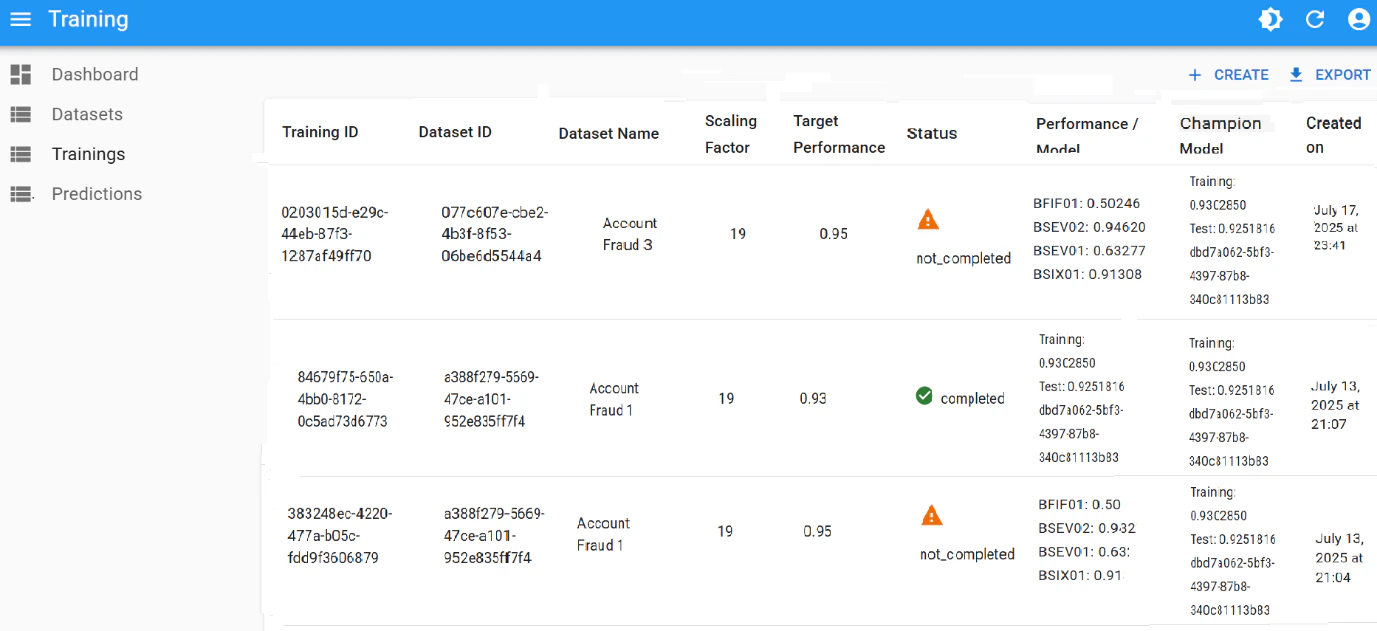 * If a training reaches a very close value (e.g. `0.94`), update threshold to that value and rerun