

What you put in
Two labelled CSVs:
Both keep their labels. The test file is how each candidate column set gets marked; the run never
learns from it, it only scores against it. Same columns, same order, in both.
One setting: number of buckets (4, 10 or 20). Higher can refine more accurately and takes
longer. 10 is the recommended starting point. See Tuning.
Details of column layout and what makes a file acceptable are in
Input data.
What you get out
Refined train CSV
Your train file with the removed columns dropped.
Refined test CSV
The same treatment applied to your test file, so the pair still matches.
Column status
One
KEEP or REMOVE per original column, in header order. Downloadable as CSV.- The performance target the refined data reached. Carry this into training. It is the single most important number the run produces.
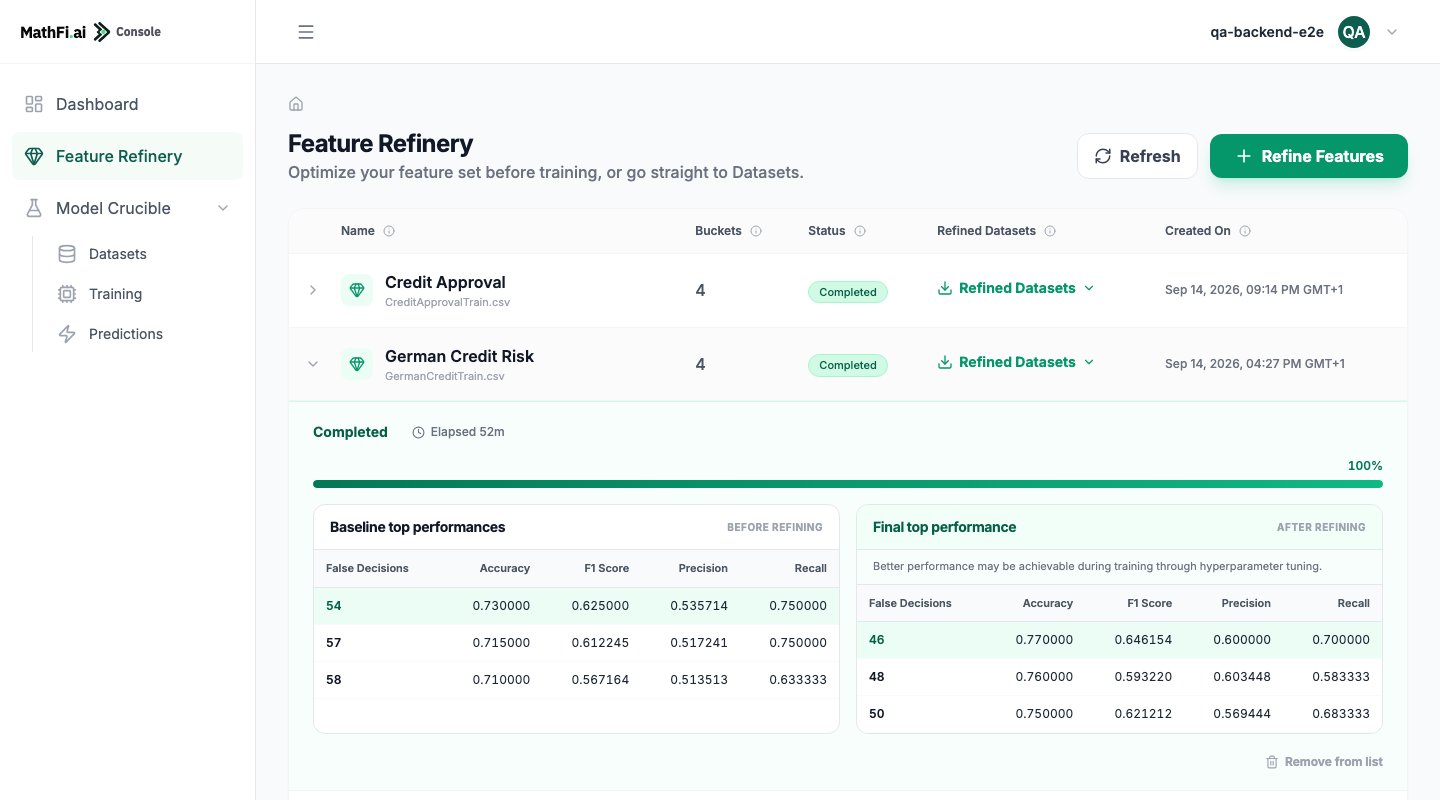
- Baseline and final performance tables. What the best models scored before refining and after, so the improvement is visible rather than asserted.
How it decides
The run first establishes a baseline: it trains many models on your data with every column present, and records how many decisions the best of them got wrong. Then, one column at a time, it removes the column, retrains the same way, and compares. A column is removed for good only when performance holds up without it. Otherwise the column goes back and the run moves on. Every removal re-bases the comparison, so each decision is made against the best the data has managed so far, not against where it started. Three things can happen to a column:
The third case is the interesting one. Every dataset has a few columns the prediction is built on;
removing one does not degrade the model, it destroys it. Expect a handful, and do not treat them as
a problem.
Results vary run to run. The same inputs can give different baselines and different column
decisions, because many independent trainings are averaged and they do not all land the same way.
Treat a single run as evidence, not as proof. If a column’s status matters to a decision you are
making, run it twice.
What it costs you in time
A run is dominated by the number of columns, not by the number of rows. Each column is a full round of training, so a 20-column file runs roughly twice as long as a 10-column file on the same data. Raising the bucket count lengthens it further. For a sense of scale: a 21-column file at 4 buckets finished in 52 minutes. Wider files, or higher bucket counts, take longer. The run reports elapsed time and a progress fraction throughout, so start it and come back.Limits
Refinement takes binary targets today; multi-class refinement is a capability we plan to add. Take
a multi-class dataset straight to Model Crucible, which handles it.
Cancelling
Cancellation is cooperative. The run finishes the round it is in and then stops, which can take 15 to 20 minutes. The run keeps reporting a running state until it actually stops, so poll until the state is terminal rather than assuming the cancel took effect.What happens next
The natural next step is to hand the finished run straight to Model Crucible. The refined train and test files come across as they are, already split, already reduced, and the target the refinement reached is carried with them. Nothing is re-uploaded. You can also just download the refined files and use them elsewhere. The column decisions are yours either way.Walk through it
A full run on a public credit-risk dataset, with the numbers.
Do it over the API
Create, upload, start, poll, download.